What is React?
React is a declarative JavaScript library for building user interfaces, especially single-page applications (SPA).
It is open source and was created at Facebook (Meta) in 2013.

Declarative
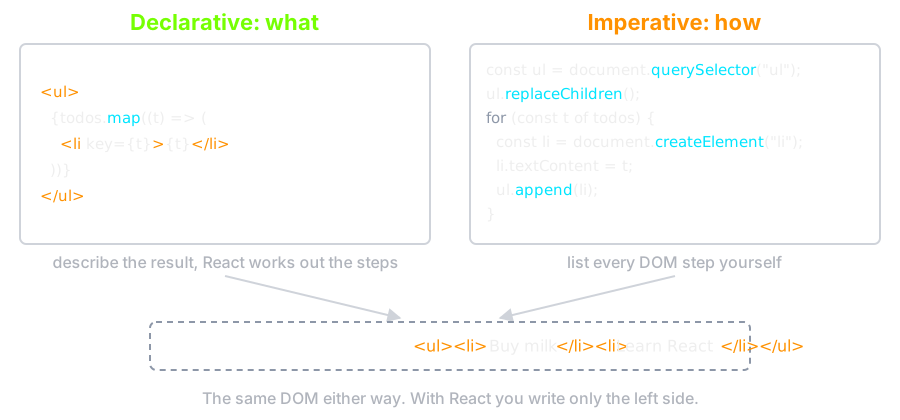
Declarative: Tell me what you want to do
Imperative: Tell me how to do it
Single Page Application (SPA)
A single-page application loads one web document, then updates its content with JavaScript instead of asking the server for a new page.
No refresh required for navigation!
Component
Components are the building blocks of any React app.
Components let you split the UI into independent, reusable pieces, and think about each piece in isolation.
How can we create a component?
There are two kinds of component
- Function component — what you write today
- Class component — what you will meet in older code
Function component
function Button() {
  return <button>Click me!</button>;
}
- A function that returns what should be on the screen
- The name must start with a capital
letter — that is how JSX tells your component from
<button>
Class component ⚰️
class Button extends React.Component {
  render() {
    return <button>Click me!</button>;
  }
}
- Note the
extends React.Component— without it this is just a class with a method calledrender - React's own documentation has treated these as legacy since 2023. Learn to read them, write function components
So ...
A component is a function that returns markup?

Because the markup can contain values
function Button() {
  const text = "Click me!!!";

  return <button>{text}</button>;
}
And it can branch
function Button({ isLoading }) {
  if (isLoading) {
    return <button disabled>Loading…</button>;
  }

  return <button>Now you can click me</button>;
}

JSX
- Rendering logic is inherently coupled with UI logic
- So we need a way to have the markup and the logic in one place
- We can use JSX
- JSX stands for JavaScript XML
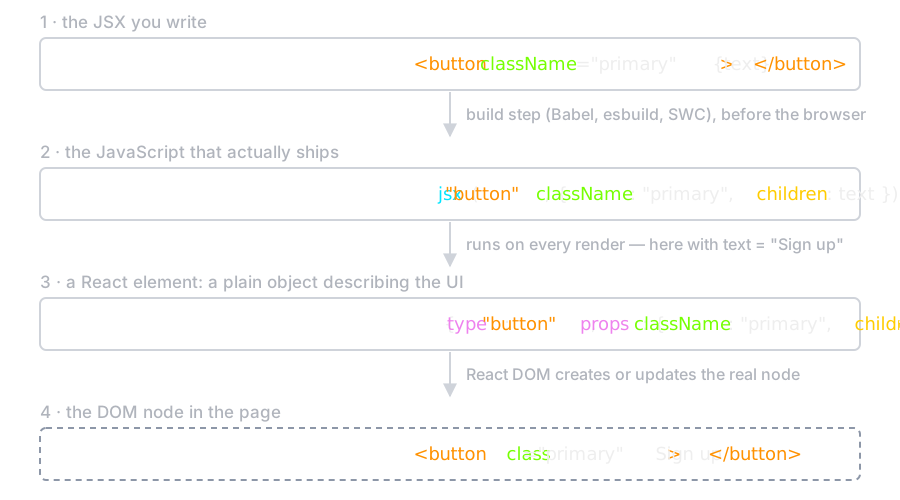
- It is not HTML and not a string — the build step turns every tag into a function call
What the Build Step Makes
We can write JavaScript inside JSX inside { }
function Greeting() {
  const text = "Click me!!!";

  return <button>{text}</button>;
}

function Year() {
  {/* the current year, recomputed on every render */}
  return <p>We're in {new Date().getFullYear()}</p>;
}
- Do not name a component
Date— it would shadow the built-in you are trying to call
One Root Element
A component returns one node.
// ❌ adjacent JSX elements must be wrapped
return (
  <p>Counter</p>
  <button>Increment</button>
);

// ✅ a fragment groups them without adding a DOM node
return (
  <>
    <p>Counter</p>
    <button>Increment</button>
  </>
);
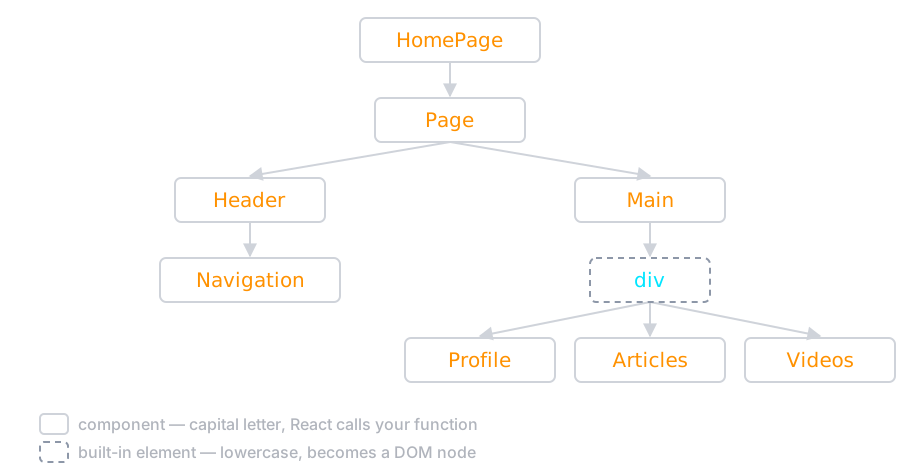
Composing components
function HomePage() {
  return (
    <Page>
      <Header>
        <Navigation />
      </Header>
      <Main>
        <div>
          <Profile />
          <Articles />
          <Videos />
        </div>
      </Main>
    </Page>
  );
}
The same page as a tree
We can render conditionally
function NotificationButton({ hasNewNotification }) {
  return (
    <>
      <Button />
      {hasNewNotification && <NotificationBadge />}
    </>
  );
}
&&renders the right side only when the left is true
Is this component reusable?
function Button() {
  return <button>Click me!!!</button>;
}
What if we want a button with 'submit' text?
function ClickMeButton() {
  return <button>Click me!!!</button>;
}

function SubmitButton() {
  return <button>Submit</button>;
}
One component per label does not scale.
How can we make this component reusable?
Props
Props are arguments passed into React components.
- stands for properties and is used to pass data from one component to another
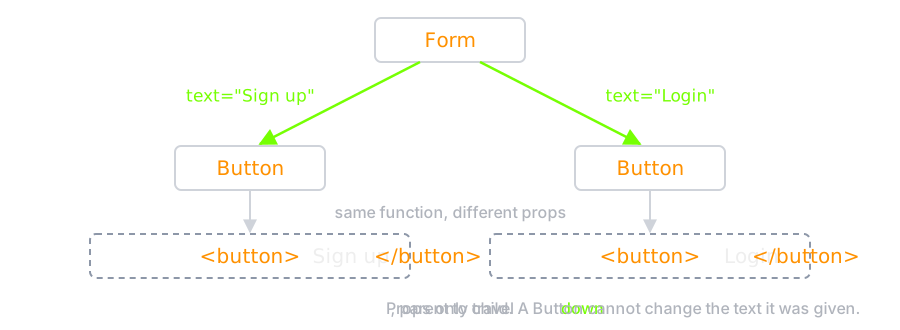
- Props flow in one direction, parent to child
- Props are read-only: a child must never modify what its parent gave it
How can we use Props?
- Set the prop where you render the component
- Receive it as the function's argument
- Use it in the markup
Pass props down to components
<Form>
  <Button text="Sign up" />
  <Button text="Login" />
</Form>
Read the prop inside the component
function Button(props) {
  return <button>{props.text}</button>;
}
Components can have many props
function Coffee({ name, img, description, price }) {
  return (
    <article>
      <img src={img} alt={name} />
      <h4>{name}</h4>
      <h5>{price}</h5>
      <p>{description}</p>
    </article>
  );
}
- Destructuring in the parameter list saves writing
props.everywhere - JSX has no void elements:
<img />must close itself
State
React components can have internal state
State is like a component's memory
When the state changes, React re-renders the component and updates the screen
Let's implement a counter and see state in action
First Attempt
function Counter() {
  let counterValue = 0;

  const handleIncrementClick = () => {
    counterValue++;
  };

  return (
    <>
      <p>Counter value is: {counterValue}</p>
      <button onClick={handleIncrementClick}>Increment</button>
    </>
  );
}
- Note
onClick, notonclick— JSX event props are camelCase, and the lowercase spelling silently does nothing
Two Problems
- Nothing tells React that anything changed, so the screen never updates
counterValueis a local variable. The next render starts the function again and resets it to 0- We need a value React remembers between renders, and that tells React when it changed
We can declare state with the useState hook
const [value, setValue] = useState(initialValue);
// value    — the current state, for this render
// setValue — asks React for a new render with a new value
// name them whatever you like; [x, setX] is the convention
// call useState once per independent piece of state
Working Counter
import { useState } from "react";

function Counter() {
  const [value, setValue] = useState(0);

  const handleIncrementClick = () => {
    setValue(value + 1);
  };

  return (
    <>
      <p>Counter value is: {value}</p>
      <button onClick={handleIncrementClick}>Increment</button>
    </>
  );
}
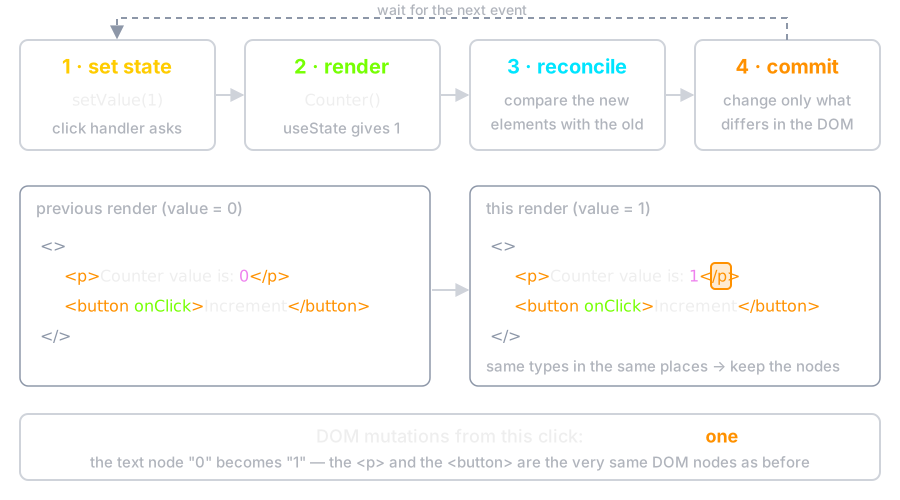
value++would not work: never assign to state directly, always go through the setter
What a Click Does
Updating From the Previous Value
// ❌ both calls read the same `value`, so this adds 1, not 2
setValue(value + 1);
setValue(value + 1);

// ✅ the updater form sees the latest value
setValue((v) => v + 1);
setValue((v) => v + 1);
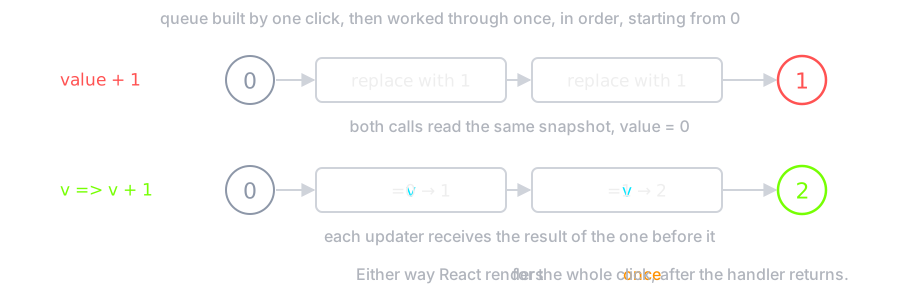
valueis a snapshot of this render. It does not change until the next one
Component Styling
- className, not
class—classis a reserved word in JavaScript - The
styleprop takes an object, with camelCased properties and units included
<button className="primary large">Save</button>;

<button style={{ backgroundColor: "#ff9100", paddingInline: "1rem" }}>
  Save
</button>;
Where the CSS Lives
- Plain stylesheet:
import "./Button.css", global like any CSS - CSS Modules:
Button.module.css— class names are made unique at build time, so they cannot collide - Utility classes (Tailwind) or CSS-in-JS — same idea, different place to write it
import styles from "./Button.module.css";

function Button({ text }) {
  return <button className={styles.primary}>{text}</button>;
}
Conditional Classes
function Button({ text, isPrimary }) {
  return (
    <button className={isPrimary ? "primary" : "secondary"}>{text}</button>
  );
}
It is just a string, so any expression that makes one will do.
Fetch External Data
- Fetching is a side effect: it is not part of computing the screen from props and state
- Never fetch in the body of a component — that runs on every render, and each response triggers another one
useEffectruns code after the render is on screen
Three Pieces of State
import { useEffect, useState } from "react";

function Person({ id }) {
  const [person, setPerson] = useState(null);
  const [error, setError] = useState(null);
  const [isLoading, setIsLoading] = useState(true);

  useEffect(() => {
    const controller = new AbortController();

    setIsLoading(true);

    fetch(`https://swapi.dev/api/people/${id}/`, {
      signal: controller.signal,
    })
      .then((response) => {
        if (!response.ok) {
          throw new Error(`unexpected status: ${response.status}`);
        }
        return response.json();
      })
      .then(setPerson)
      .catch((err) => {
        if (err.name !== "AbortError") setError(err);
      })
      .finally(() => setIsLoading(false));

    return () => controller.abort();
  }, [id]);

  if (isLoading) return <p>Loading…</p>;
  if (error) return <p>Could not load this person.</p>;

  return <h4>{person.name}</h4>;
}
The Two Details That Matter
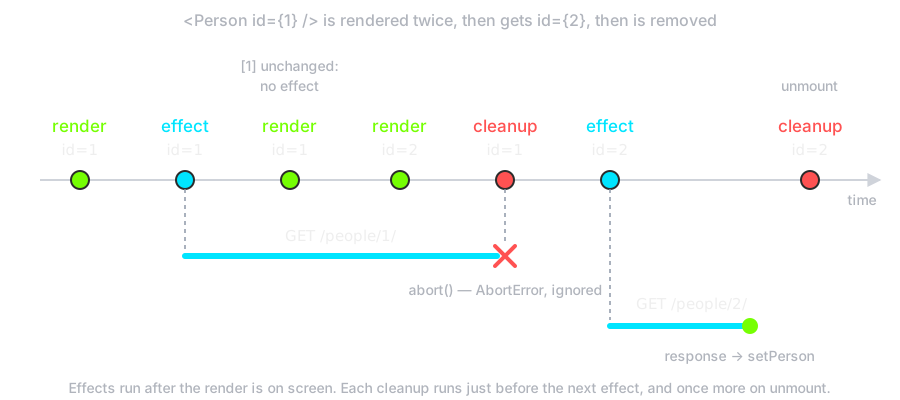
- The dependency array
[id]— the effect re-runs whenidchanges. Leave it out and it runs after every render - The cleanup function — returned from the effect, it runs before the next one and on unmount. Here it aborts a request whose answer nobody is waiting for any more
- Without cleanup, a slow response for an old
idcan arrive last and overwrite the new one
Effect Timeline
In Practice
Real applications hand this to a library — TanStack Query, or the data loaders in Next.js and React Router — which add caching, retries and deduplication on top of exactly this.
Write it by hand once, so you know what they are doing for you.