Internet Engineering

08

CGI

Introduction

Fall 2026 · Amirkabir University of Technology
@1995parham

Introduction

  • HTML/XHTML content is static
    • JavaScript makes pages more dynamic, but the content is almost static
  • Dynamic content
    • Pages that look differently depending on the user who visits, status, processing requests, etc.
    • E.g. Search engines, web mails, etc.
  • Web applications (hotel booking, web search applications, …) is not possible using only HTML/XHTML, CSS and JS; why?

Typical Web based Application

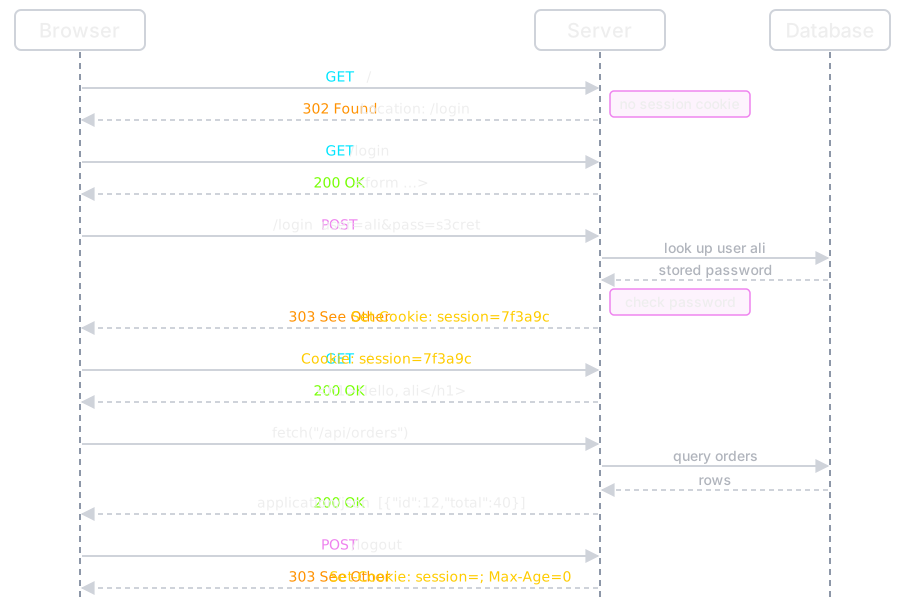
A sequence between browser, server and database. GET / gets 302 Found to /login because there is no session cookie. GET /login gets 200 OK with the form. POST /login with user=ali&pass=s3cret makes the server look up ali in the database and check the password, then answer 303 See Other with Set-Cookie: session=7f3a9c. GET / with that cookie gets 200 OK with Hello, ali. fetch("/api/orders") makes the server query the database and answer 200 OK with JSON. POST /logout gets 303 See Other with Set-Cookie: session=; Max-Age=0.
Every answer here is decided by code on the server.

Common Gateway Interface

  • We need code beside web servers
    • Web server by itself is not designed for data processing
  • Initial idea
    • An external program can perform the processing
  • Questions
    • How can client ask server to run an external program?!
      • New HTTP Method to run (e.g. HTTP RUN)?!! 🤔
    • How does web server exchange information with the external program?
      • Sending input data & Getting the output
      • The mechanism should be standard

Common Gateway Interface (Cont.)

  • The Standard protocol for interfacing external application software with the web server
    • CGI 1.1 specified in RFC 3875, 2004
  • The external program runs by the standard HTTP requests & proper server configuration
  • HTTP response is the output of the external program on the server machine

One CGI Request

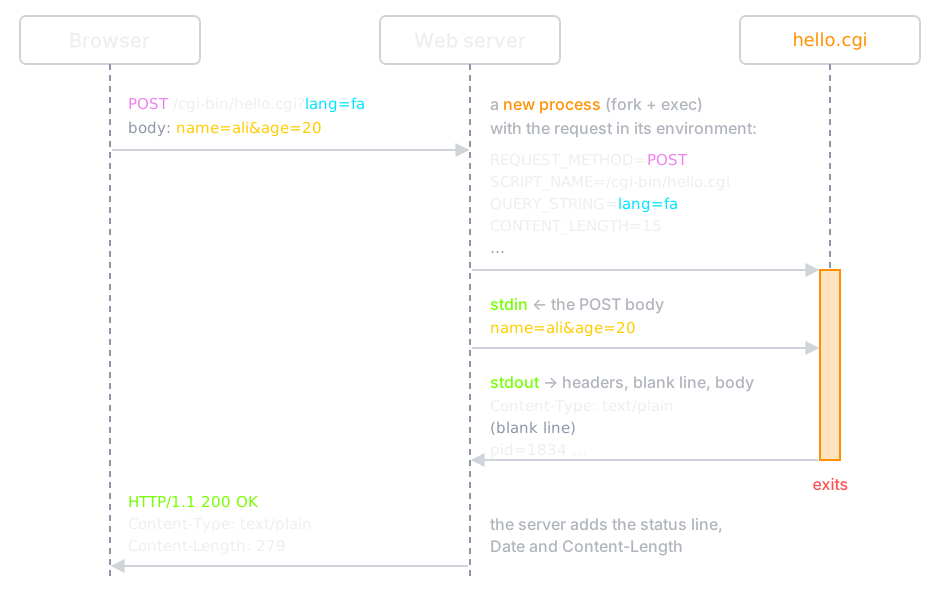
A sequence between browser, web server and hello.cgi. The browser sends POST /cgi-bin/hello.cgi?lang=fa with body name=ali&age=20. The server starts hello.cgi as a new process with REQUEST_METHOD=POST, SCRIPT_NAME=/cgi-bin/hello.cgi, QUERY_STRING=lang=fa and CONTENT_LENGTH=15 in its environment, and writes the body to its stdin. The script writes Content-Type: text/plain, a blank line and the body to stdout, then exits. The server adds the status line, Date and Content-Length and sends HTTP/1.1 200 OK to the browser.
In: environment variables and stdin. Out: stdout. A real run.

CGI Example: Server Config


<IfDefine ENABLE_USR_LIB_CGI_BIN>
  ScriptAlias /cgi-bin/ /var/www/html/IE/cgi-enabled/
  <Directory "/var/www/html/IE/cgi-enabled/">
    AllowOverride None
    Options +ExecCGI -MultiViews +SymLinksIfOwnerMatch
    Require all granted
  </Directory>
</IfDefine>
  

CGI Example: Source Code


#include <stdio.h>

int main(void){
  // http header
  printf("Content-Type: text/html\r\n");

  // a blank line ends the header
  printf("\r\n");

  // http body
  printf("<html><head></head>\r\n");
  printf("<body>\r\n");
  printf("Hello world.\r\n");
  printf("<br />\r\n");
  printf("Bye Bye\r\n");
  printf("</body></html>\r\n");
  return 0;
}
  

CGI Example: Compile


> ~# cd /var/www/html/IE/cgi-enabled
> /var/www/html/IE/cgi-enabled# gcc -Wall -o hello_c.cgi hello_c.c
> /var/www/html/IE/cgi-enabled# ./hello_c.cgi
Content-Type: text/html

<html><head></head>
<body>
Hello world.
<br />
Bye Bye
</body></html>
> /var/www/html/IE/cgi-enabled# ./hello_c.cgi | od -c | head -3
0000000   C   o   n   t   e   n   t   -   T   y   p   e   :       t   e
0000020   x   t   /   h   t   m   l  \r  \n  \r  \n   <   h   t   m   l
0000040   >   <   h   e   a   d   >   <   /   h   e   a   d   >  \r  \n
  

CGI Example: Through the Server


> /var/www/html/IE/cgi-enabled# curl -si http://localhost/cgi-bin/hello_c.cgi
HTTP/1.1 200 OK
Date: Wed, 14 Oct 2026 04:31:42 GMT
Server: Apache/2.4.68 (Debian)
Vary: Accept-Encoding
Content-Length: 76
Content-Type: text/html

<html><head></head>
<body>
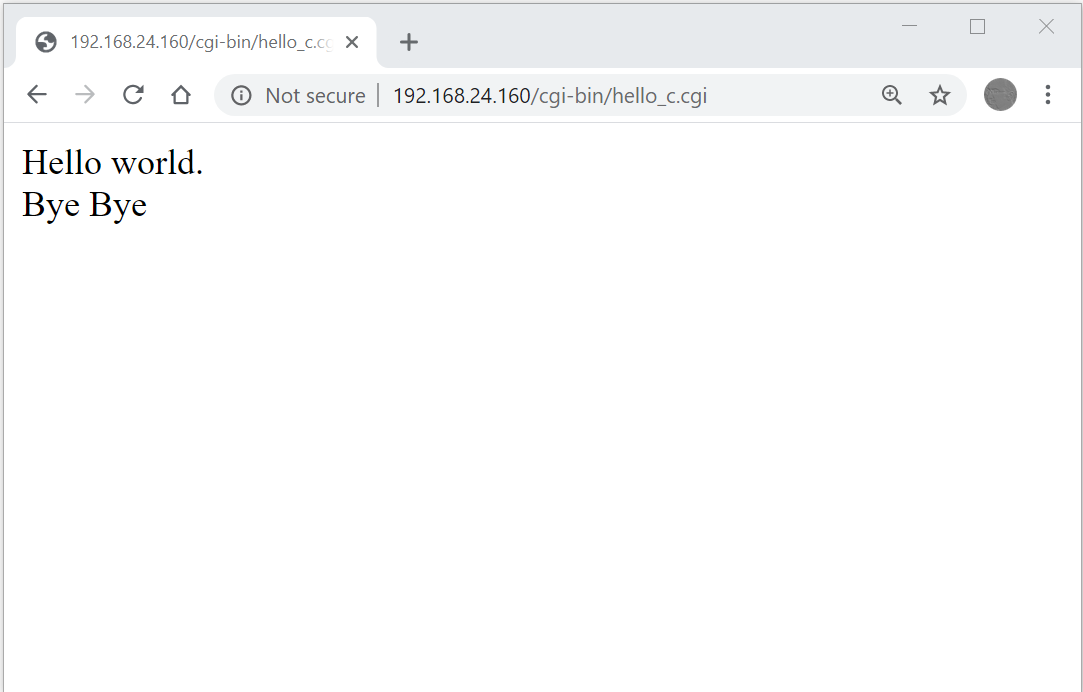
Hello world.
<br />
Bye Bye
</body></html>
  

The script wrote one header; Apache added the status line, Date, Server, Vary and Content-Length.

CGI Example: Test

cgi-test

The “Hello World” CGI in Bash Script


#!/bin/bash

# http headers
echo "Content-Type: text/html"
echo ""

# http body
echo "<html><head></head>"
echo "<body>"
echo "Hello world."
echo "<br />"
echo "Bye Bye"
echo "</body></html>"
  

Getting parameters from the client

  • Parameters can be passed from the user to the CGI script through an html <form> or fetch or ...

<form action="script.cgi" method="GET">
  <input type="…" name="input1" />
  <input type="…" name="input2" />
  …
  <input type="…" name="inputN" />
</form>
  
  • The script.cgi will get the parameters as:
  • 
    input1=val1&input2=val2& ... &inputN=valN
        
  • The mechanism depends on the HTTP Method

Getting parameters from the client

  • Parameters can be sent through the GET method
    • CGI script will receive the parameters from the web server in an environment variable $QUERY_STRING
    • In C: You can access it by getenv("QUERY_STRING")
  • Parameters can be passed through the POST method (in the body of the HTTP Request)
    • The CGI script will receive the parameters from the web server in the standard input (stdin)

CGI Environment Variables

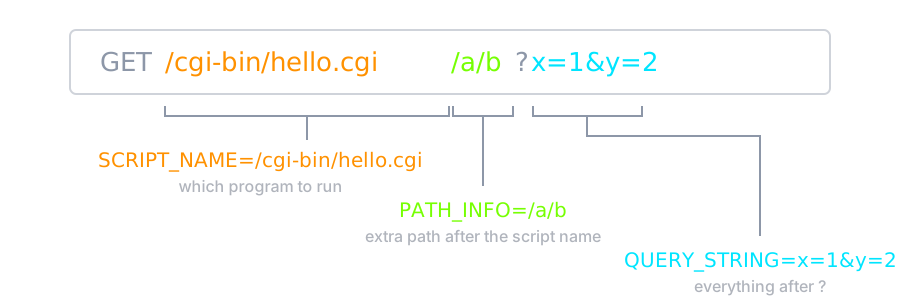
The request GET /cgi-bin/hello.cgi/a/b?x=1&y=2 split into SCRIPT_NAME=/cgi-bin/hello.cgi, PATH_INFO=/a/b and QUERY_STRING=x=1&y=2
CONTENT_TYPEThe data type of the content. Used when the client is sending attached content to the server. For example, file upload.
CONTENT_LENGTHThe length of the query information. It is available only for POST requests.
HTTP_COOKIEReturns the set cookies in the form of key & value pair.
HTTP_USER_AGENTThe User-Agent request-header field contains information about the user agent originating the request. It is name of the web browser.
PATH_INFOThe extra path in the URL after the script name. Requesting /cgi-bin/hello.cgi/a/b runs hello.cgi with PATH_INFO=/a/b — this is how one script serves many paths.
QUERY_STRINGThe URL-encoded information that is sent with GET method request.
REMOTE_ADDRThe IP address of the remote host making the request. This is useful logging or for authentication.
REMOTE_HOSTThe fully qualified name of the host making the request. If this information is not available, then REMOTE_ADDR can be used to get the IP address.
REQUEST_METHODThe method used to make the request. The most common methods are GET and POST.
SCRIPT_FILENAMEThe full path to the CGI script.
SCRIPT_NAMEThe name of the CGI script.

CGI Pros & Cons

  • What is the main advantage(s) of CGI?
    • Any programming language can be used
  • What the main drawback(s) of CGI?
    • We should generate whole HTML document in CGI
    • For each request, a new process is created
      • Process creation & termination & Inter-process communication overhead
    • Security is another major issue
  • Any other way to run code in server side?

Solving CGI Problems

CGI pays process start-up on every request: fork, exec, load the interpreter, open the database, answer, exit. Every fix keeps the program running between requests:

ApproachWhere the code runsExamples
Server moduleinside the web server's own workersmod_php, mod_perl
FastCGIlong-lived worker processes; the server talks to them over a socketPHP-FPM
Application serverthe app is its own HTTP server, behind a reverse proxyGunicorn, Node.js, Go net/http

Server-side scripting (next) also lets you mix code into the HTML instead of printing the whole page.

Overview of Server-Side Scripting

Five steps. 1: the browser sends GET /hello.php?name=ali. 2: the web server picks a handler by the file name: .html and .png files are read from disk and sent as they are, .php files go to the PHP runtime (mod_php inside the server or PHP-FPM beside it). 3: the runtime parses the request into $_GET, $_POST, cookies and the session. 4: it runs the code inside the HTML of hello.php, so <p>Hello, <?= htmlspecialchars($_GET["name"]) ?></p> becomes <p>Hello, ali</p>. 5: only that output goes back to the browser as 200 OK.

Embed vs. External Server Side Code

  • External code
    • A separated program: C, C++, …
    • Server runs it and sends its output back to client
  • Embed code
    • Scripting inside the HTML
      • Embed programming interface within server
        • Which is called when server see the scripting directions
    • Examples
      • Perl: Apache mod_perl module to embed
      • Java Server Pages (JSP): Compiled and served by a JSP server
      • Python
      • PHP (the most common language)

Server Side Scripting Benefits

  • How does server side scripting solve CGI problems?
    • We don’t need to generate whole HTML by code
      • Only dynamic parts are coded
    • A process is not created per request
      • All requests are processed by the interpreter
        • Which is implemented as a library for web server process
      • Each request is served by an existing worker (process or thread)
        • Low creation & termination & inter-communication overhead
    • The run-time environment control the code
      • More secure execution

CGI vs. Server Module

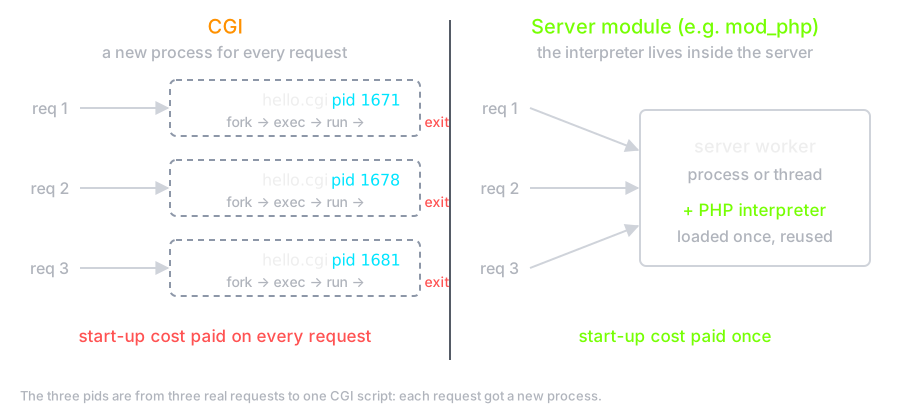
Left, CGI: three requests start three hello.cgi processes, pids 1671, 1678 and 1681, and each one exits, so the start-up cost is paid on every request. Right, a server module such as mod_php: the same three requests go to one long-lived server worker with the PHP interpreter loaded once and reused.

Major differences w.r.t client side programming

  • Concurrency
    • Each server side program (cgi, php, …) can (and usually) runs multiple times concurrently
      • A process/thread per request
    • Be very very careful about shared resources (files)
  • Security
    • Each server side program allows client (including the hackers) to run code on your server
      • Vulnerable code = Hacker access
    • Be very very careful about input from the client
53-big-decisions
Fork me on GitHub