Introduction
- HTML + CSS + JavaScript: Interactive Web pages
- Web server is not involved after page is loaded
- JavaScript reacts to user events
- However, most web applications needs data from server after the page is loaded
- A common (standard) format to exchange data
- A mechanism to communication:
fetch - (Almost) always the data is structured
Introduction (Contd.)
- In general (not only in web) to store or transport data, we need a common format, to specify the structure of data; e.g.,
- Documents: PDF, DOCx, PPTx, ...
- Objects: Java Object Serialization/Deserialization
- How to define the data structure?
- Binary format (similar to binary files)
- Difficult to develop & debug
- machine depended
- ...
- Text format (similar to text files)
- Easy to develop & debug
- human readable
- ...
Introduction (Cont.)
- Example: Data structure of a class
- Course name, teacher, # of students, each student information
type Course struct {
  Name     string
  Teacher  string
  Students []Student
  Capacity int
}

type Student struct {
  FirstName string
  LastName  string
  ID        string
}

c := Course {
  Name: "IE",
  Teacher: "Parham Alvani",
  Students: []Student{
    { FirstName: "Parham", LastName: "Alvani", ID: "9231058" },
  },
  Capacity: 30,
}
{
  "name": "IE",
  "teacher": "Parham Alvani",
  "students": [
    { "first_name": "Parham", "last_name": "Alvani", "id": "9231058" }
  ],
  "capacity": 30
}
The Same Course in CBOR
A4                                 # map(4)
   64 6E616D65                     # text(4) "name"
   62 4945                         # text(2) "IE"
   67 74656163686572               # text(7) "teacher"
   6D 50617268616D20416C76616E69   # text(13) "Parham Alvani"
   68 73747564656E7473             # text(8) "students"
   81                              # array(1)
      A3                           # map(3)
         6A 66697273745F6E616D65   # text(10) "first_name"
         66 50617268616D           # text(6) "Parham"
         69 6C6173745F6E616D65     # text(9) "last_name"
         66 416C76616E69           # text(6) "Alvani"
         62 6964                   # text(2) "id"
         67 39323331303538         # text(7) "9231058"
   68 6361706163697479             # text(8) "capacity"
   18 1E                           # unsigned(30)
The Same Course, Positional
No names, no types: both sides must agree on the order (name, teacher, capacity, number of students, then each student)
IE
Parham Alvani
30
1
Parham
Alvani
9231058
JSON
- JavaScripters' approach
- JSON: JavaScript Object Notation
- Data is represented as a JS (POD) object
- Standards: RFC 8259, ECMA-404
{
  "name": "IE",
  "teacher": "Parham Alvani",
  "students": [
    { "first_name": "Parham", "last_name": "Alvani", "id": "9231058" }
  ],
  "capacity": 30
}
JSON Syntax
- Data is in name-value pairs
- Field name in double quotes, followed by a colon, followed by a value
- In JSON, the keysmust be strings
- Data is separated by commas
- Curly braces hold objects
- Square brackets hold arrays
- Data Types:
- string
"This is a string"
  42
  3.1415926
{ "key1": "value1", "key2": "value2" }
[ "first", "second", "third" ]
true
false
null
Why to Study JSON: Benefits
- Simplify data sharing & transport
- JSON is text based and platform independent
- JSON is simple, efficient, and popular
- Extensive libraries to process JSON
- To validate, to present, …
- In web application, data separation from HTML
- E.g., table structure by HTML, table data by JSON
Documentation & Validation
- Assume that application A exchange data with application B
- How does A's developer document the data format?
- How does the receiver know the structure of the data?
- In English?
- By samples?
- How can the receiver validate the data?
Valid Data
- Syntax
- Syntax rules
- E.g., all keys must be double quoted in JSON
- Error makes the parser fails to parse the file
- Semantics (structure)
- Application specific rules
- E.g. student must have ID
- Error makes the application fails
How to Validate structure?
- Application specific programs need to check structure of data
- Different applications needs different programs
- Change in data structure needs code modification
- General validator + reference document
- Reference document
- JSON: JSON Schema
Parser, then Validator
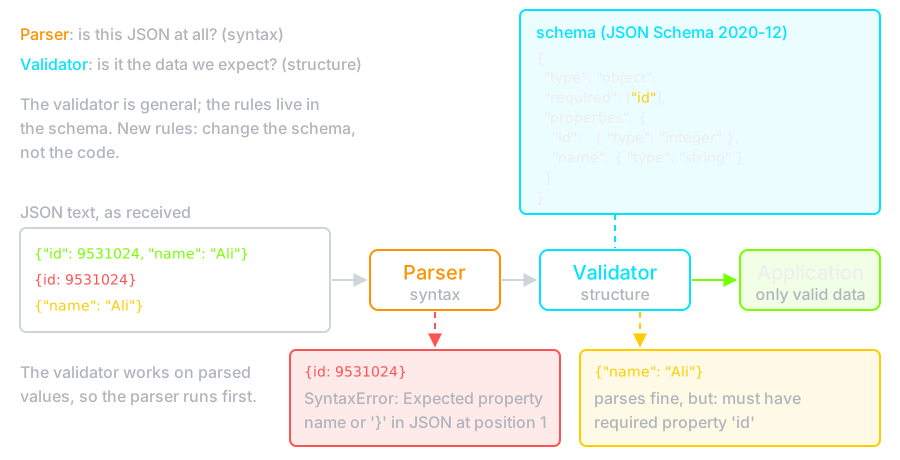
The Reference Documents Usage
- The Reference document is the answer of
- Documentation: It describes the structure of data which is human readable
- Interaction: The description is machine readable
- Validation: There are validators to validate the data based on it
JSON Schema
- JSON schema is JSON also
- The JSON document being validated or described we call the instance, and the document containing the description is called the schema.
Hello World
- This accepts anything, as long as it's valid JSON
{}
type keyword is used
for that.
{ "type": "string" }
Declaring a JSON Schema
- Since JSON Schema is itself JSON, it's not always easy to tell when something is JSON Schema or just an arbitrary chunk of JSON.
- The
$schemakeyword is used to declare that something is JSON Schema. - It's generally good practice to include it, though it is not required.
{ "$schema": "https://json-schema.org/draft/2020-12/schema" }
{ "$schema": "http://json-schema.org/draft-07/schema#" }
Declaring a unique identifier
- It is also best practice to include an
$idproperty as a unique identifier for each schema. - For now, just set it to a URL at a domain you control, for example:
{ "$id": "http://yourdomain.com/schemas/myschema.json" }
Annotations
- JSON Schema includes a few keywords,
title,description,default,examplesthat aren't strictly used for validation, but are used to describe parts of a schema. - The
titleanddescriptionkeywords must be strings. - A "title" will preferably be short, whereas a "description" will provide a more lengthy explanation about the purpose of the data described by the schema.
- The
defaultkeyword specifies a default value for an item.
String
{ "type": "string" }
- Length
- The length of a string can be constrained using the
minLengthandmaxLengthkeywords. - For both keywords, the value must be a non-negative number.
- Regular Expressions
- The
patternkeyword is used to restrict a string to a particular regular expression.
String (Contd.)
- Format
- The
formatkeyword allows for basic semantic validation on certain kinds of string values that are commonly used. - Dates and times
- Email addresses
- Host names
- IP Addresses
- ...
Numeric types
- The integer type is used for integral numbers.
{ "type": "integer" }
{ "type": "number" }
Numeric types (Contd.)
- Multiples
- Numbers can be restricted to a multiple of a given number, using the
multipleOf - It may be set to any positive number.
- Range
- Ranges of numbers are specified using a combination of the
minimumandmaximumkeywords
Object
- Objects are the mapping type in JSON.
{ "type": "object" }
- The properties (key-value pairs) on an object are defined using the
propertieskeyword. - The value of
propertiesis an object, where each key is the name of a property and each value is a JSON schema used to validate that property. - properties: Object<String, Schema>
Object (Contd.)
{
  "type": "object",
  "properties": {
    "number":      { "type": "number" },
    "street_name": { "type": "string" },
    "street_type": { "type": "string",
                     "enum": ["Street", "Avenue", "Boulevard"]
                   }
  }
}
Object (Contd.)
- The
additionalPropertieskeyword is used to control the handling of extra stuff - properties whose names are not listed in the
propertieskeyword. - By default any additional properties are allowed
- If
additionalPropertiesis an object, that object is a schema that will be used to validate any additional properties not listed in properties.
{
  "type": "object",
  "properties": {
    "number": { "type": "number" },
    "street_name": { "type": "string" },
    "street_type": { "enum": ["Street", "Avenue", "Boulevard"] }
  },
  "additionalProperties": { "type": "string" }
}
{
  "type": "object",
  "properties": {
    "number": { "type": "number" },
    "street_name": { "type": "string" },
    "street_type": { "enum": ["Street", "Avenue", "Boulevard"] }
  },
  "additionalProperties": false
}
Object (Contd.)
- By default, the properties defined by the properties keyword are not required.
- The
requiredkeyword takes an array of zero or more strings.
Object (Contd.)
{
  "type": "object",
  "properties": {
    "name":      { "type": "string" },
    "email":     { "type": "string" },
    "address":   { "type": "string" },
    "telephone": { "type": "string" }
  },
  "required": ["name", "email"]
}
Array
- Arrays are used for ordered elements.
- In JSON, each element in an array may be of a different type.
{ "type": "array" }
items keyword to a single schema that
will be used to validate all of the items in the array.Array (Contd.)
{
  "type": "array",
  "items": {
    "type": "number"
  }
}
Example
{
  "$schema": "https://json-schema.org/draft/2020-12/schema",
  "title": "Product",
  "type": "object",
  "properties": {
    "id": {
      "type": "number",
      "description": "Product identifier"
    },
    "name": { "type": "string" },
    "price": { "type": "number", "minimum": 0 },
    "tags": {
      "type": "array",
      "items": { "type": "string" }
    },
    "stock": {
      "type": "object",
      "properties": {
        "warehouse": { "type": "number" },
        "retail": { "type": "number" }
        }
      }
   }
}
Example (Contd.)
{
  "id": 1,
  "name": "Foo",
  "price": 123,
   "tags": [
    "Bar",
    "Eek"
  ],
  "stock": {
   "warehouse": 300,
   "retail": 20
  }
}
JSON Schema Validator
- Validators available
- As Online tools
- As programming languages libraries
- Standalone tools
The JSON object, has two very useful methods to deal with JSON-formatted contentJSON.parse()takes a JSON string and transforms it into a JavaScript objectJSON.stringify()takes a JavaScript object and transforms it into a JSON string
let myObj = { a: '1', b: 2, c: '3' };
let myObjStr = JSON.stringify(myObj);
console.log(myObjStr);
console.log(JSON.parse(myObjStr));
Example Message Parser
{
  "type": "object",
  "properties": {
    "messages": {
      "type": "array",
      "items": {
        "type": "object",
        "properties": {
          "from": {
            "type": "string"
          },
          "to": {
            "type": "string"
          },
          "body": {
            "type": "string"
          }
        }
      }
    }
  }
}
function parseJSON() {
  const input = document.getElementById("json-in-2").value;
  const jsonData = JSON.parse(input);
  const out = document.getElementById("json-out-2");

  out.replaceChildren();

  for (const msg of jsonData.messages) {
    const p = document.createElement("p");
    // textContent, never innerHTML: this text came from the user
    p.textContent = `${msg.from} sent to ${msg.to}: ${msg.body}`;
    out.append(p, document.createElement("hr"));
  }
}
document.getElementById("json-btn-2").onclick = parseJSON;
Based on
- Alireza Mohammadi
- Amir Hallaji Bidgoli
- Spring 2021

Introduction
- Apache Thrift is an open source, cross-language serialization and remote procedure call (RPC) framework.
- With support for more than 20 programming languages, Apache Thrift can play an important role in many distributed application solutions.
Introduction (Cont.)
- As a serialization platform, it enables efficient cross-language storage and retrieval of a wide range of data structures.
- As an RPC framework, Apache Thrift enables rapid development of complete cross-language services with little more than a few lines of code.
Introduction (Cont.)
Languages supported by Apache Thrift :
| Go | C | Python |
| JavaScript | C++ | TypeScript |
| OCaml | Objective-C | ActionScript |
| Ruby | Haxe | Node.js |
| D | Php | Elixir |
| Dart | Smalltalk | Scala |
| Haskell | C# | Swift |
| Lua | Erlang | Delphi |
| Perl | Java | Rust |
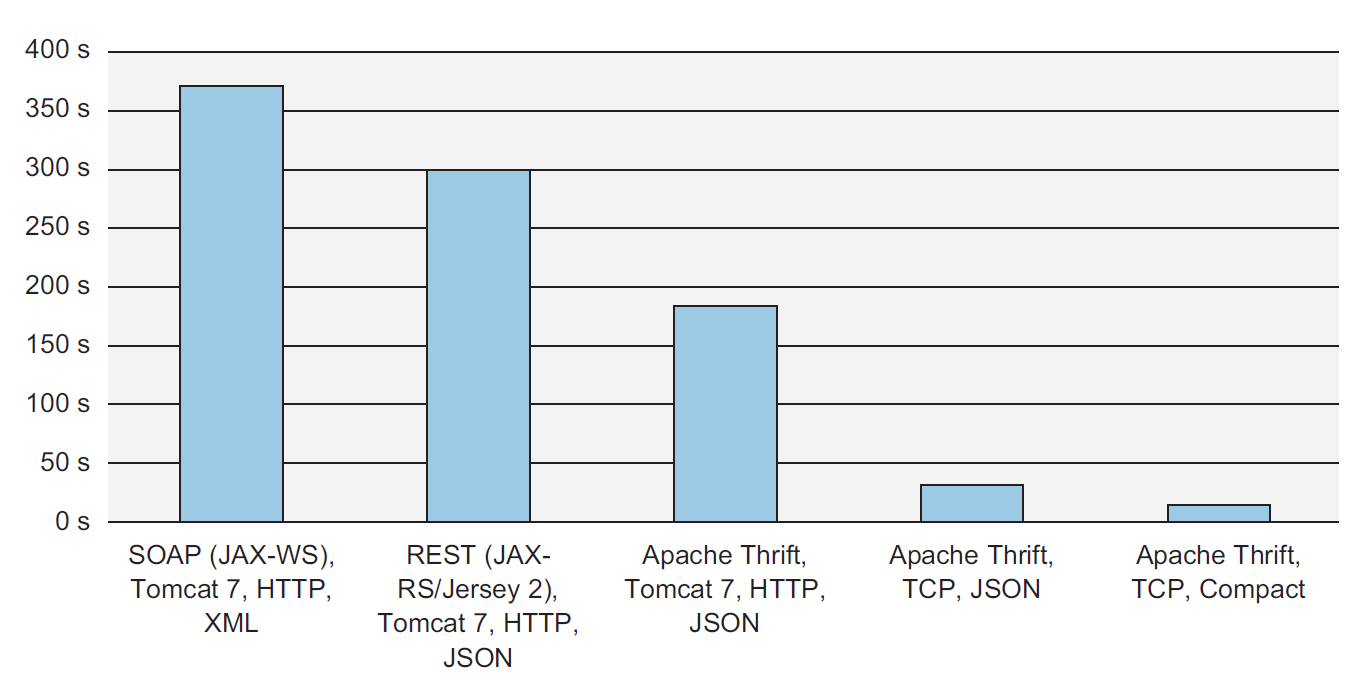
Brief History
- It was developed at Facebook and it is now an open source project in the Apache Software Foundation.
- The implementation was described in an April 2007 technical paper released by Facebook, now hosted on Apache.
Thrift Definition File
/**
 * Thrift files can reference other Thrift files to include common struct
 * and service definitions. These are found using the current path, or by
 * searching relative to any paths specified with the -I compiler flag.
 *
 * Included objects are accessed using the name of the .thrift file as a
 * prefix. i.e. shared.SharedObject
 */
include "shared.thrift"

/**
 * You can define enums, which are just 32 bit integers. Values are optional
 * and start at 1 if not supplied, C style again.
 */
enum Operation {
 ADD = 1,
 SUBTRACT = 2,
 MULTIPLY = 3,
 DIVIDE = 4
}

/**
 * Structs are the basic complex data structures. They are comprised of fields
 * which each have an integer identifier, a type, a symbolic name, and an
 * optional default value.
 *
 * Fields can be declared "optional", which ensures they will not be included
 * in the serialized output if they aren't set.  Note that this requires some
 * manual management in some languages.
 */
struct Work {
  1: i32 num1 = 0,
  2: i32 num2,
  3: Operation op,
  4: optional string comment,
}

/**
 * Structs can also be exceptions, if they are nasty.
 */
exception InvalidOperation {
  1: i32 whatOp,
  2: string why
}

/**
 * Ahh, now onto the cool part, defining a service. Services just need a name
 * and can optionally inherit from another service using the extends keyword.
 */
service Calculator extends shared.SharedService {

  /**
   * A method definition looks like C code. It has a return type, arguments,
   * and optionally a list of exceptions that it may throw. Note that argument
   * lists and exception lists are specified using the exact same syntax as
   * field lists in struct or exception definitions.
   */

   void ping(),

   i32 add(1:i32 num1, 2:i32 num2),

   i32 calculate(1:i32 logid, 2:Work w) throws (1:InvalidOperation ouch),

   /**
    * This method has a oneway modifier. That means the client only makes
    * a request and does not listen for any response at all. Oneway methods
    * must be void.
    */
   oneway void zip()

}
Python Client
if __name__ == "__main__":
    # Make socket
    transport = TSocket.TSocket('localhost', 9090)

    # Buffering is critical. Raw sockets are very slow
    transport = TTransport.TBufferedTransport(transport)

    # Wrap in a protocol
    protocol = TBinaryProtocol.TBinaryProtocol(transport)

    # Create a client to use the protocol encoder
    client = Calculator.Client(protocol)

    # Connect!
    transport.open()

    client.ping()
    print('ping()')

    sum_ = client.add(1, 1)
Java Server
public class JavaServer {
  public static void main(String[] args) {
    CalculatorHandler handler = new CalculatorHandler();
    Calculator.Processor<CalculatorHandler> processor =
        new Calculator.Processor<>(handler);

    simple(processor);
  }

  public static void simple(Calculator.Processor<CalculatorHandler> processor) {
    try {
      TServerTransport serverTransport = new TServerSocket(9090);
      TServer server =
          new TSimpleServer(new Args(serverTransport).processor(processor));

      System.out.println("Starting the simple server...");
      server.serve();
    } catch (Exception e) {
      e.printStackTrace();
    }
  }
}
Java Handler
public class CalculatorHandler implements Calculator.Iface {

  private HashMap<Integer,SharedStruct> log;

  public CalculatorHandler() {
    log = new HashMap<Integer, SharedStruct>();
  }

  public void ping() {
    System.out.println("ping()");
  }

  public int add(int n1, int n2) {
    System.out.println("add(" + n1 + "," + n2 + ")");
    return n1 + n2;
  }

  public int calculate(int logid, Work work) throws InvalidOperation {
    System.out.println("calculate(" + logid + ", {" + work.op + "," + work.num1 + "," + work.num2 + "})");
    int val = 0;
    switch (work.op) {
    case ADD:
      val = work.num1 + work.num2;
      break;
    case SUBTRACT:
      val = work.num1 - work.num2;
      break;
    case MULTIPLY:
      val = work.num1 * work.num2;
      break;
    case DIVIDE:
      if (work.num2 == 0) {
        InvalidOperation io = new InvalidOperation();
        io.whatOp = work.op.getValue();
        io.why = "Cannot divide by 0";
        throw io;
      }
      val = work.num1 / work.num2;
      break;
    default:
      InvalidOperation io = new InvalidOperation();
      io.whatOp = work.op.getValue();
      io.why = "Unknown operation";
      throw io;
    }

    SharedStruct entry = new SharedStruct();
    entry.key = logid;
    entry.value = Integer.toString(val);
    log.put(logid, entry);

    return val;
  }

  public SharedStruct getStruct(int key) {
    System.out.println("getStruct(" + key + ")");
    return log.get(key);
  }

  public void zip() {
    System.out.println("zip()");
  }
}
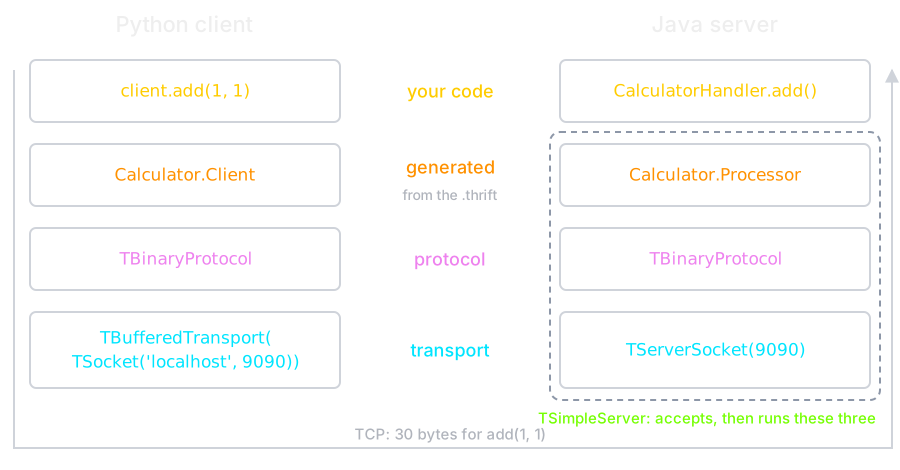
The Stack
On the Wire
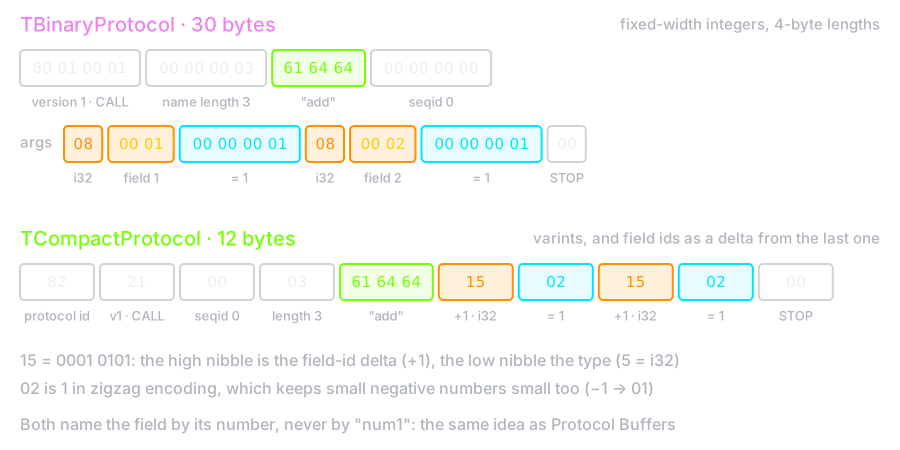
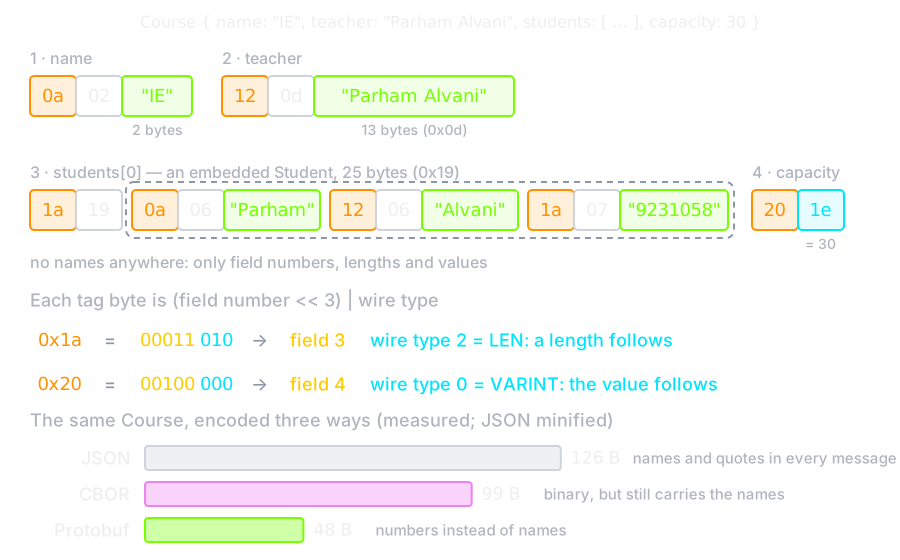
Swap one class on each side and the same call is 2.5× smaller.
gRPC
- Thrift's idea, as it is usually met today: describe the service once, generate the client and the server
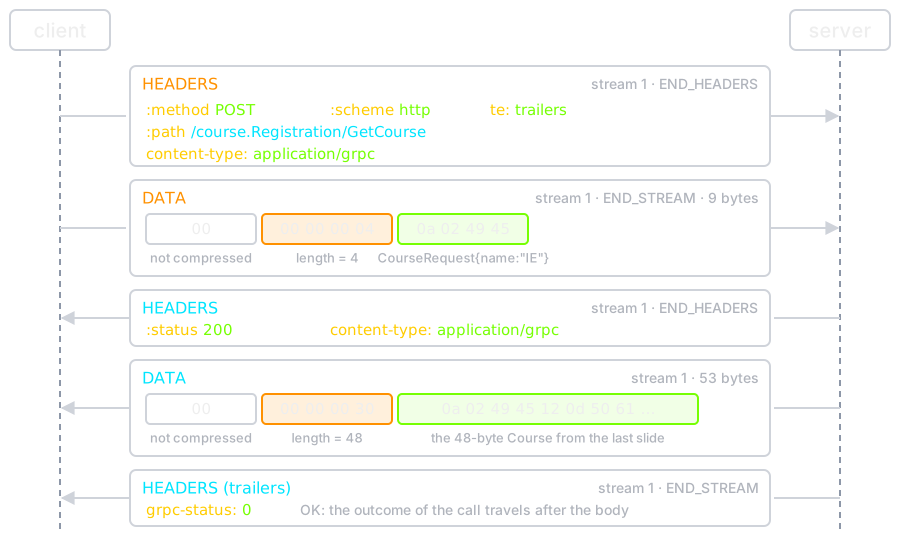
- Protocol Buffers for the payload, HTTP/2 for the transport
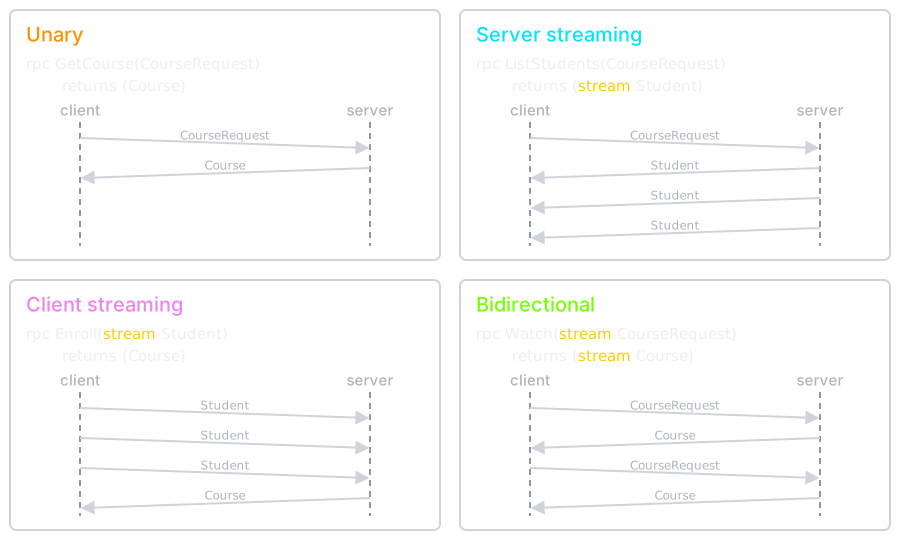
- HTTP/2 brings multiplexing and, unlike request/response ReST, streaming in both directions
Service Definition
syntax = "proto3";

package course;

message Student {
  string first_name = 1;
  string last_name  = 2;
  string id         = 3;
}

message CourseRequest {
  string name = 1;
}

message Course {
  string name = 1;
  string teacher = 2;
  repeated Student students = 3;
  int32 capacity = 4;
}

service Registration {
  rpc GetCourse(CourseRequest) returns (Course);
}
Field Numbers
- The numbers, not the names, are what goes on the wire, so a field can be renamed freely
- A number must never be reused: an old client would read the new field as the old one
- Unknown fields are preserved rather than rejected, which is what makes rolling upgrades possible
On the Wire
One Call over HTTP/2
Four Kinds of RPC
Compared to JSON over ReST
- Smaller and faster: binary, and no field names in the payload
- A real contract: the
.protois the schema, and the compiler enforces it on both sides - Not readable with curl, and not directly callable from a browser without a proxy
- Rule of thumb: gRPC between services, JSON at the edge facing browsers
What is Next?!
- Other data exchange technologies, not covered here
- YAML (YAML Ain't Markup Language): human-friendly text, YAML 1.2 is almost a superset of JSON
- MessagePack: schemaless binary JSON, like CBOR
- Apache Avro: binary with a JSON schema, common with Kafka
- FlatBuffers and Cap'n Proto: read fields in place, no parse step