What is CORS?
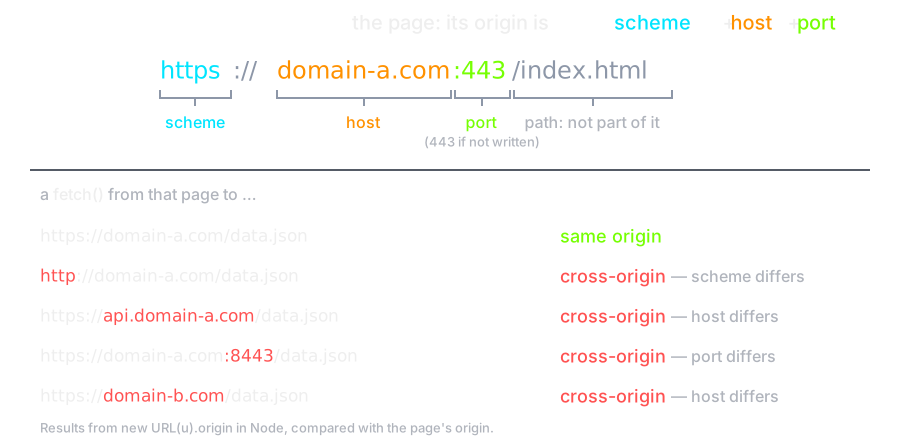
Cross-Origin Resource Sharing (CORS) is an HTTP-header based mechanism that allows a server to indicate any origins (domain, scheme, or port) other than its own from which a browser should permit loading resources.
What is an Origin?
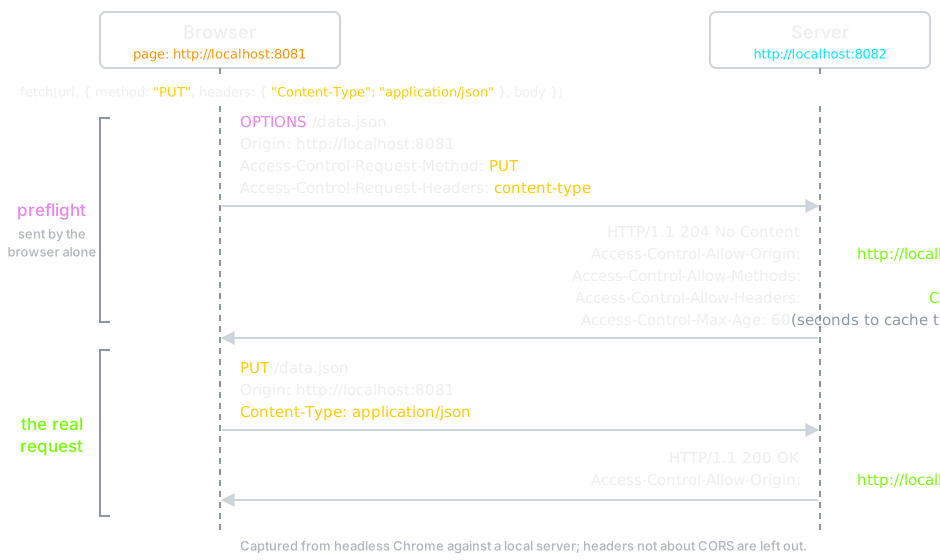
CORS also relies on a mechanism by which browsers make a preflight request to the server hosting the cross-origin resource, in order to check that the server will permit the actual request. In that preflight, the browser sends headers that indicate the HTTP method and headers that will be used in the actual request.
Preflight
CORS Policy
The Cross-Origin Resource Sharing standard works by adding new HTTP headers that let servers describe which origins are permitted to read that information from a web browser.
Usage
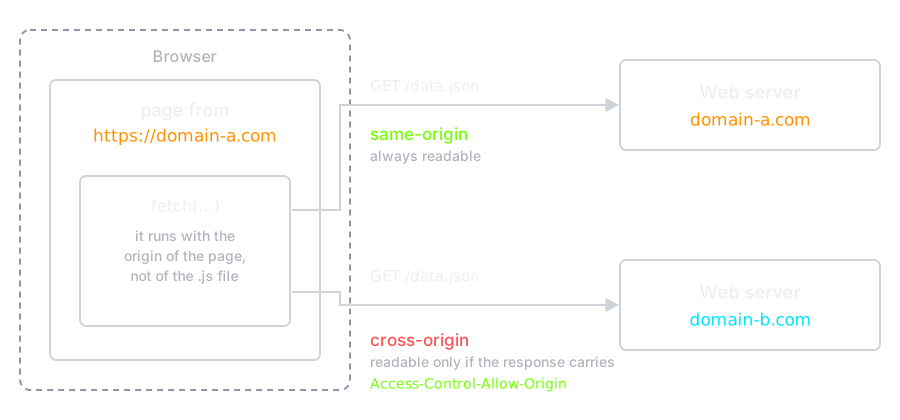
For security reasons, browsers restrict cross-origin HTTP requests initiated from scripts. The Fetch API (and the older XMLHttpRequest) follow the same-origin policy. This means that a web application using those APIs can only request resources from the same origin the application was loaded from unless the response from other origins includes the right CORS headers.
Example
An example of a cross-origin request, the front-end JavaScript code served
from
https://domain-a.com uses fetch to
make a request for
https://domain-b.com/data.json.
Another Example
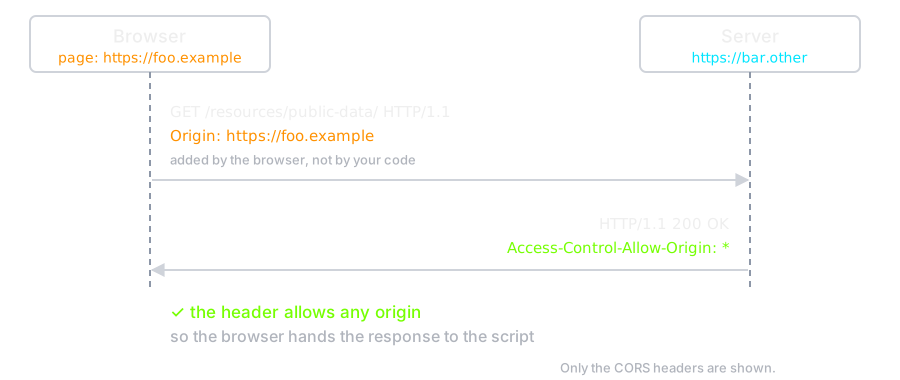
For example, suppose web content at https://foo.example wishes to invoke content on domain https://bar.other. Code of this sort might be used in JavaScript deployed on foo.example:
const url = "https://bar.other/resources/public-data/";

const response = await fetch(url);
const data = await response.json();
This operation performs a simple exchange between the client and the server, using CORS headers to handle the privileges:
Here is what Chrome actually sent to the server in this case (User-Agent
and the sec-ch-ua client hints left out):
GET /resources/public-data/ HTTP/1.1
Host: bar.other
Connection: keep-alive
Accept: */*
Origin: https://foo.example
Sec-Fetch-Site: cross-site
Sec-Fetch-Mode: cors
Sec-Fetch-Dest: empty
Referer: https://foo.example/
Accept-Encoding: gzip, deflate, br, zstd
Accept-Language: en-US,en;q=0.9
The request header of note is Origin, which the browser adds
to show that the invocation is coming from
https://foo.example. Now let's see how the
server responds:
HTTP/1.1 200 OK
Access-Control-Allow-Origin: *
Content-Type: application/json
Date: Wed, 14 Oct 2026 04:28:57 GMT
Connection: keep-alive
Keep-Alive: timeout=5
Transfer-Encoding: chunked

{"users":42}
The server answers with Access-Control-Allow-Origin: *, which means that the resource can be accessed by any origin.
CORS Error
What people call a CORS error
is not really CORS at all. The
restriction is the same-origin policy,
which the browser applies by default; CORS is the mechanism a server uses
to relax it.
So the message means: the server did not opt in.
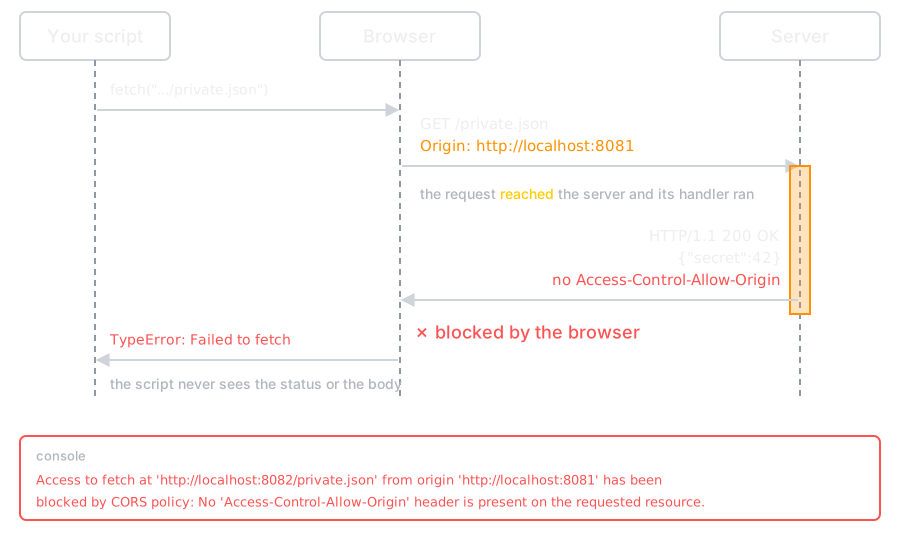
The request did reach the server; it is the response the browser keeps from your code.
Fixing CORS Error
When you are developing an application, you can fix CORS error in Front-end or Back-end.
Proxy Server (Frontend)
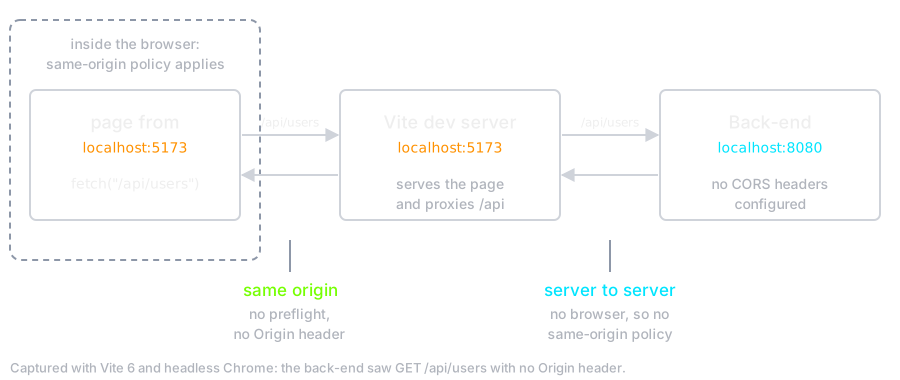
When you are developing a Front-end application, you often cannot change the responses of the server you are calling. Instead, let the development server act as a proxy: the page sends its request to the server it came from, so the browser sees a same-origin request. The proxy forwards it to the back-end server to server, where the same-origin policy does not apply, and hands the answer back as its own response. No CORS is involved at any step.
Flow
Example
With Create React App (now legacy, but you will meet it) the setting lives
in package.json:
{
  "name": "application",
  "version": "0.1.0",
  "private": true,
  "proxy": "http://localhost:8080"
}
With Vite the same setting lives in
vite.config.js:
export default defineConfig({
  server: {
    proxy: {
      "/api": "http://localhost:8080",
    },
  },
});
Why does it work?
The browser only ever talks to the development server, so from its point of view every request is same-origin and no preflight is sent at all. The development server then forwards the request to the back-end from outside the browser, where the same-origin policy does not apply, and returns the answer as its own response.
Be careful
This is a development-time workaround only. In production the development server is gone, so the back-end must either send the right CORS headers or be served from the same origin as the front-end.
CORS Middleware (Backend)
When you are developing a back-end service, you add the
Access-Control-Allow-* headers to your
responses — you cannot set them on the
request, the browser owns that side. We usually do it with a middleware
that every response passes through.
Example
In Fiber framework of Golang, there is middleware called CORS. We use it in our application instance so all requests will be CORS request.
import (
  "github.com/gofiber/fiber/v3"
  "github.com/gofiber/fiber/v3/middleware/cors"
)

func NewApp() *fiber.App {
    // create a new app
    app := fiber.New()

    // Default config
    app.Use(cors.New())

    return app
}
See the full documentation of Fiber CORS middleware .